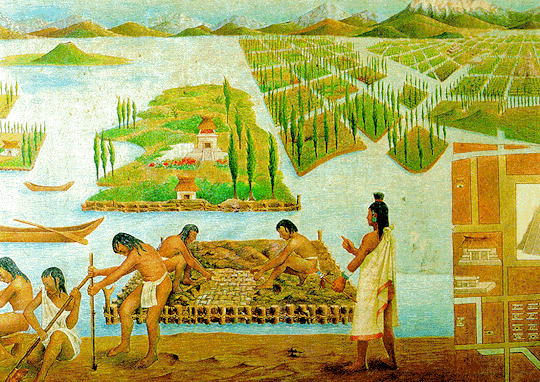
How on earth would you feed a city of over 200,000 people when the land around you was a swampy lake? Seems like an impossible task, but the Aztec managed it by creating floating gardens known as chinampas, then they farmed them intensively.
These ingenious creations were built up from the lake bed by piling layers of mud, decaying vegetation and reeds. This was a great way of recycling waste from the capital city Tenochtitlan. Each garden was framed and held together by wooden poles bound by reeds and then anchored to the lake floor with finely pruned willow trees. The Aztecs also dredged mud from the base of the canals which both kept the waterways clear and rejuvenate the nutrient levels in the gardens.
A variety of crops were grown, most commonly maize or corn, beans, chillies, squash, tomatoes, edible greens such as quelite and amaranth. Colourful flowers were also grown, essential produce for religious festivals and ceremonies. Each plot was systematically planned, the effective use of seedbeds allowed continuous planting and harvesting of crops.
Between each garden was a canal which enabled canoe transport. Fish and birds populated the water and were an additional source of food. [x]
This is literally so cool. Not only does it contribute to spacial efficiency, but the canals would easily keep pests, weeds, and possibly even diseases out of the respective plots. Companion planting and bio-intensive planting would be so much easier. Water-wise systems would be inherently present. Plus it looks so super neat aesthetically. I am just all about this.
Indigenous civilizations invented sustainable development way before there was a term for it.
I’ve said this to my non-techie friends countless times. It’s no secret that being able to code makes you a better job applicant, and a better entrepreneur. Hell, one techie taught a homeless man to code and now that man is making his first mobile application.
(note: yes I realize that 3/5 of those links were Google projects)
But most folks are intimidated by coding. And it does seem intimidating at first. But peel away the obscurity and the difficulty, and you start to learn that coding, at least at its basic level, is a very manageable, learnable skill.
There are a lot of resources out there to teach you. I’ve found a couple to be particularly successful. Here’s my list of resources for learning to code, sorted by difficulty:
Novice
Never written a line of code before? No worries. Just visit one of these fine resources and follow their high-level tutorials. You won’t get into the nitty-gritty, but don’t worry about it for now:
w3 Tutorials (start at HTML on the left sidebar and work your way down)
Intermediate
Now that you’ve gone through a handful of basic tutorials, it’s time to learn the fundamentals of actual, real-life coding problems. I’ve found these resources to be solid:
If you’re here, you’re capable of building things. You know the primitives. You know the logic control statements. You’re ready to start making real stuff take shape. Here are some different types of resources to turn you from someone who knows how to code, into a full-fledged programmer.
Programming problems
Sometimes, the challenges in programming aren’t how to make a language do a task, but just how to do the task in general. Like how to find an item in a very large, sorted list, without checking each element. Here are some resources for those types of problems
If you learned Python, Django is an amazing platform for creating quick-and-easy web applications. I’d highly suggest the tutorial – it’s one of the best I’ve ever used, and you have a web app up and running in less than an hour.
I’ve never used Rails, but it’s a very popular and powerful framework for creating web applications using Ruby. I’d suggest going through their guide to start getting down-and-dirty with Rails development.
If you know PHP, there’s an ocean of good stuff out there for you to learn how to make a full-fledged web application. Frameworks do a lot of work for you, and provide quick and easy guides to get up and running. I’d suggest the following:
If there’s one point I wanted to get across, it’s that it is easier than ever to learn to code. There are resources on every corner of the internet for potential programmers, and the benefits of learning even just the basics are monumental.
If you know of any additional, great resources that aren’t listed here, please feel free to tweet them to me @boomeyer.
Best of luck!
I’d also like to add some more specialized resources!
SpriteKit (2D) and SceneKit (3D) which are built into the official compiler to create iOS apps (see iOS apps for more resources)
also all of the above game engines (cross-platform)
Game console development:
Game Maker Studio (with a paid subscription)
Unity
Unreal
CryEngine
Note that games can also be created on more general platforms like iOS and Android apps, but the resources listed above are specialized for game development.
iOS apps:
In order to develop iOS apps, you’ll need to purchase an iOS developer program membership for $99 a year, which requires an Apple account. Here are some general resources:
Xcode (the official IDE for iOS apps; can be installed on OS X)
Xcode also has SpriteKit, SceneKit, and Metal built in, all of which are incredibly useful for creating apps that require elaborate graphics, particularly games.
Also, in order to publish iOS apps, you’ll have to juggle certificates, app ids, and provisioning profiles. This process can be convoluted at times so here are some resources:
Blender (can also be used to create games; Python script; free and open-source; can be installed on Windows, OS X, and Linux)
Maya (specialized script; free trial, free 3-year student subscription, and paid subscription versions; can be installed on Windows, OS X, and Linux to an extent)
3ds Max (Python script; free trial, free 3-year student subscription, and paid subscription versions; can be installed on Windows and OS X)
RenderMan (specialized script; free for non-commercial/educational use and pay-per-license for commercial use; can be installed on Windows, OS X, and Linux)
Misc. resources:
Stack Overflow is an ask-and-answer community for programmers. It’s amazing and will save your life. Sign up and don’t be afraid to ask for help.
Github offers a student pack (here) if you create an account and prove you’re a student. This gives you free access to a bunch of great programming resources for free for a certain period of time, such as Unreal Engine. Also, Github in general is a site that you can host your code on. Other users can see it, and “fork” it to make a copy of your code and modify it.
Parse is a backend service that allows you to store data in databases it hosts on its own servers. It lets you use push notifications, create users, store and retrieve data, etc. It’s compatible with iOS apps, Android apps, Windows apps, Xamarin, React, Unity, OS X, Windows, JavaScript, PHP, .net, Arduino, and Embedded C. It’s free up to a certain limit that depends on the services you use.
Cloud9, Codebox, and Squad are online IDEs that allow for real-time collaboration and support a variety of languages, so they’re useful for team projects.
And some general advice:
Your program will not work right away, 99% of the time. That’s okay. Do your best to figure out where the error is. Here is some advice on debugging (written for PHP but the methods can be generalized).
If you’re stuck, Google. Google like there’s no tomorrow.
Ask questions on a community like Stack Overflow.
For that matter, browse relevant Stack Overflow questions. You can probably find some solutions there.
Don’t be afraid to copy and paste.
Take breaks sometimes if you’re getting burned out. But don’t stay away from your projects for too long or you’ll lose track of its status.
Backup your code. On the cloud, on a USB drive, wherever. If your IDE has a backing up feature like snapshots, use it whenever you hit a milestone.
If your project is big, split it up into milestones and set goals. Don’t tackle everything at once.
Like the OP said, coding isn’t just for professionals and “geeks” anymore. Anyone can learn it if you really try, and with the rapidly expanding tech industry, learning coding can really broaden your opportunities.
If any of the links are broken, or you have a question or some information/resources to add, you can contact me through the askbox or the OP through his Twitter (as mentioned in his post).
If you’re interested, try some of these out and best of luck!
Great work expanding on my humble list to include a much fuller collection of resources for learning how to code! Cheers!
I just did a quick perusal of the Coptic resources on this site, and it has all the resources I’ve personally found worthwhile and then some. These are resources that took me months, if not years, to discover and compile. I am thoroughly impressed. The other languages featured on the site are:
Akkadian
Arabic
Aramaic
Church Slavonic
Egyptian (hieroglyphics and Demotic)
Elamite
Ethiopic (Ge’ez)
Etruscan
Gaulish
Georgian
Gothic
Greek
Hebrew
Hittite
Latin
Mayan (various related languages/dialects)
Old Chinese
Old English
Old French
Old Frisian
Old High German
Old Irish
Old Norse
Old Persian
Old Turkic
Sanskrit
Sumerian
Syriac
Ugaritic
For the love of all the gods, if you ever wanted to learn any of these languages, use this site.
Likely helpful for various recon-oriented polytheists.
YE OLDE HIGH GERMAN
Wow
I feel like I reblogged this before, and it’s only tangentially related to Sparkler I guess (if you wanted to research ancient languages for some creative reason?!), but I think it’s rad, and I wanted to share!
The 75 most common words make up 40% of occurrences
The 200 most common words make up 50% of occurrences
The 524 most common words make up 60% of occurrences
The 1257 most common words make up 70% of occurrences
The 2925 most common words make up 80% of occurrences
The 7444 most common words make up 90% of occurrences
The 13374 most common words make up 95% of occurrences
The 25508 most common words make up 99% of occurrences
This article has an excellent summary on how to rapidly learn a new language within 90 days.
We can begin with studying the first 600 words. Of course chucking is an effective way to memorize words readily. Here’s a list to translate into the language you desire to learn that I grabbed from here! 🙂
EXPRESSIONS OF POLITENESS (about 50 expressions)
‘Yes’ and ‘no’: yes, no, absolutely, no way, exactly.
Question words: when? where? how? how much? how many? why? what? who? which? whose?
Apologizing: excuse me, sorry to interrupt, well now, I’m afraid so, I’m afraid not.
Meeting and parting: good morning, good afternoon, good evening, hello, goodbye, cheers, see you later, pleased to meet you, nice to have met.
Interjections: please, thank you, don’t mention it, sorry, it’ll be done, I agree, congratulations, thank heavens, nonsense.
Space: into, out of, outside, towards, away from,
behind, in front of, beside, next to, between, above, on top of, below,
under, underneath, near to, a long way from, through.
Time: after, ago, before, during, since, until.
DETERMINERS (about 80 words)
Articles and numbers: a, the; nos. 0–20; nos. 30–100; nos. 200–1000; last, next, 1st–12th.
Demonstrative: this, that.
Possessive: my, your, his, her, its, our, their.
Quantifiers: all, some, no, any, many, much, more, less, a few, several, whole, a little, a lot of.
Universal: everyone, everybody, everything, each, both, all, one, another.
Indefinite: someone, somebody, something, some, a few, a little, more, less; anyone, anybody, anything, any, either, much, many.
Negative: no-one, nobody, nothing, none, neither.
ADVERBS (about 60 words)
Place: here, there, above, over, below, in front, behind,
nearby, a long way away, inside, outside, to the right, to the left,
somewhere, anywhere, everywhere, nowhere, home, upstairs, downstairs.
Time: now, soon, immediately, quickly, finally,
again, once, for a long time, today, generally, sometimes, always,
often, before, after, early, late, never, not yet, still, already, then
(=at that time), then (=next), yesterday, tomorrow, tonight.
Quantifiers: a little, about (=approximately), almost, at least, completely, very, enough, exactly, just, not, too much, more, less.
Manner: also, especially, gradually, of course,
only, otherwise, perhaps, probably, quite, so, then (=therefore), too
(=also), unfortunately, very much, well.
CONJUNCTIONS (about 30 words)
Coordinating: and, but, or; as, than, like.
Time & Place: when, while, before, after, since (=time), until; where.
I love it too! I love it mostly because it makes me feel less overwhelmed. When you break it down like this, everything seems so much more manageable. Like, hey, I could memorize 20 words at a time (even if ‘at a time’ varies wildly for me), and just do that like ten times. That’s a HUGE chunk of a language.
(And since I have the habit of doing languages that are similar to ones I’m already familiar with, the grammar part usually comes pretty easy, too.)
One of the thriftiest, most versatile ways to garden is what’s called Straw Bale gardening. Often cheaper than garden soil or fertilizer, straw bales are found virtually everywhere. Craigslist, home depot or other home improvement stores will sell them for pennies on the dime when push comes to shove.
But what can you grow?
The answer: just about anything.
Moisture and heat collect in the straw bale like a trap. Tomatoes, corn and other tall plants can break the bale apart the taller they get, but potatoes and herbs will thrive in your bale.
Hay bales start to decompose just hours after they get wet and can provide an atmosphere better than your greenhouse. By digging a hole into your bale, dropping in some soil around your plants and packing it firmly, you’ll add some stability to your plant and as your bale decomposes, it will provide a steady source of nutrition all throughout the growing season.
Classic Bookshelf: This site has put classic novels online, from Charles Dickens to Charlotte Bronte.
The Online Books Page: The University of Pennsylvania hosts this book search and database.
Project Gutenberg: This famous site has over 27,000 free books online.
Page by Page Books: Find books by Sir Arthur Conan Doyle and H.G. Wells, as well as speeches from George W. Bush on this site.
Classic Book Library: Genres here include historical fiction, history, science fiction, mystery, romance and children’s literature, but they’re all classics.
Classic Reader: Here you can read Shakespeare, young adult fiction and more.
Read Print: From George Orwell to Alexandre Dumas to George Eliot to Charles Darwin, this online library is stocked with the best classics.
Planet eBook: Download free classic literature titles here, from Dostoevsky to D.H. Lawrence to Joseph Conrad.
The Spectator Project: Montclair State University’s project features full-text, online versions of The Spectator and The Tatler.
Bibliomania: This site has more than 2,000 classic texts, plus study guides and reference books.
Online Library of Literature: Find full and unabridged texts of classic literature, including the Bronte sisters, Mark Twain and more.
Bartleby: Bartleby has much more than just the classics, but its collection of anthologies and other important novels made it famous.
Fiction.us: Fiction.us has a huge selection of novels, including works by Lewis Carroll, Willa Cather, Sherwood Anderson, Flaubert, George Eliot, F. Scott Fitzgerald and others.
Free Classic Literature: Find British authors like Shakespeare and Sir Arthur Conan Doyle, plus other authors like Jules Verne, Mark Twain, and more.
TEXTBOOKS
Textbook Revolution: Find biology, business, engineering, mathematics and world history textbooks here.
Wikibooks: From cookbooks to the computing department, find instructional and educational materials here.
Italian Women Writers: This site provides information about Italian women authors and features full-text titles too.
Biblioteca Valenciana: Register to use this database of Catalan and Valencian books.
Ketab Farsi: Access literature and publications in Farsi from this site.
Afghanistan Digital Library: Powered by NYU, the Afghanistan Digital Library has works published between 1870 and 1930.
CELT: CELT stands for “the Corpus of Electronic Texts” features important historical literature and documents.
Projekt Gutenberg-DE: This easy-to-use database of German language texts lets you search by genres and author.
HISTORY AND CULTURE
LibriVox: LibriVox has a good selection of historical fiction.
The Perseus Project: Tufts’ Perseus Digital Library features titles from Ancient Rome and Greece, published in English and original languages.
Access Genealogy: Find literature about Native American history, the Scotch-Irish immigration in the 19th and 20th centuries, and more.
Free History Books: This collection features U.S. history books, including works by Paul Jennings, Sarah Morgan Dawson, Josiah Quincy and others.
Most Popular History Books: Free titles include Seven Days and Seven Nights by Alexander Szegedy and Autobiography of a Female Slave by Martha G. Browne.
RARE BOOKS
Questia: Questia has 5,000 books available for free, including rare books and classics.
ARTS AND ENTERTAINMENT
Books-On-Line: This large collection includes movie scripts, newer works, cookbooks and more.
Chest of Books: This site has a wide range of free books, including gardening and cooking books, home improvement books, craft and hobby books, art books and more.
Free e-Books: Find titles related to beauty and fashion, games, health, drama and more.
2020ok: Categories here include art, graphic design, performing arts, ethnic and national, careers, business and a lot more.
Free Art Books: Find artist books and art books in PDF format here.
Free Web design books: OnlineComputerBooks.com directs you to free web design books.
Free Music Books: Find sheet music, lyrics and books about music here.
Free Fashion Books: Costume and fashion books are linked to the Google Books page.
MYSTERY
MysteryNet: Read free short mystery stories on this site.
TopMystery.com: Read books by Edgar Allan Poe, Sir Arthur Conan Doyle, GK Chesterton and other mystery writers here.
Mystery Books: Read books by Sue Grafton and others.
POETRY
The Literature Network: This site features forums, a copy of The King James Bible, and over 3,000 short stories and poems.
Poetry: This list includes “The Raven,” “O Captain! My Captain!” and “The Ballad of Bonnie and Clyde.”
Poem Hunter: Find free poems, lyrics and quotations on this site.
Famous Poetry Online: Read limericks, love poetry, and poems by Robert Browning, Emily Dickinson, John Donne, Lord Byron and others.
Google Poetry: Google Books has a large selection of poetry, fromThe Canterbury Tales to Beowulf to Walt Whitman.
QuotesandPoem.com: Read poems by Maya Angelou, William Blake, Sylvia Plath and more.
CompleteClassics.com: Rudyard Kipling, Allen Ginsberg and Alfred Lord Tennyson are all featured here.
PinkPoem.com: On this site, you can download free poetry ebooks.
MISC
Banned Books: Here you can follow links of banned books to their full text online.
World eBook Library: This monstrous collection includes classics, encyclopedias, children’s books and a lot more.
DailyLit: DailyLit has everything from Moby Dick to the recent phenomenon, Skinny Bitch.


 Chimaeric Archive